PSP Gateway API
版本 2026-07-01
商户服务端接入
PSP 商户 API 对接文档
本文档按 Apifox 常见接口文档方式组织:先说明公共规则,再逐个接口给出接口地址、请求参数、请求示例、返回响应和字段说明。商户按顺序完成即可自主接入。
接入流程
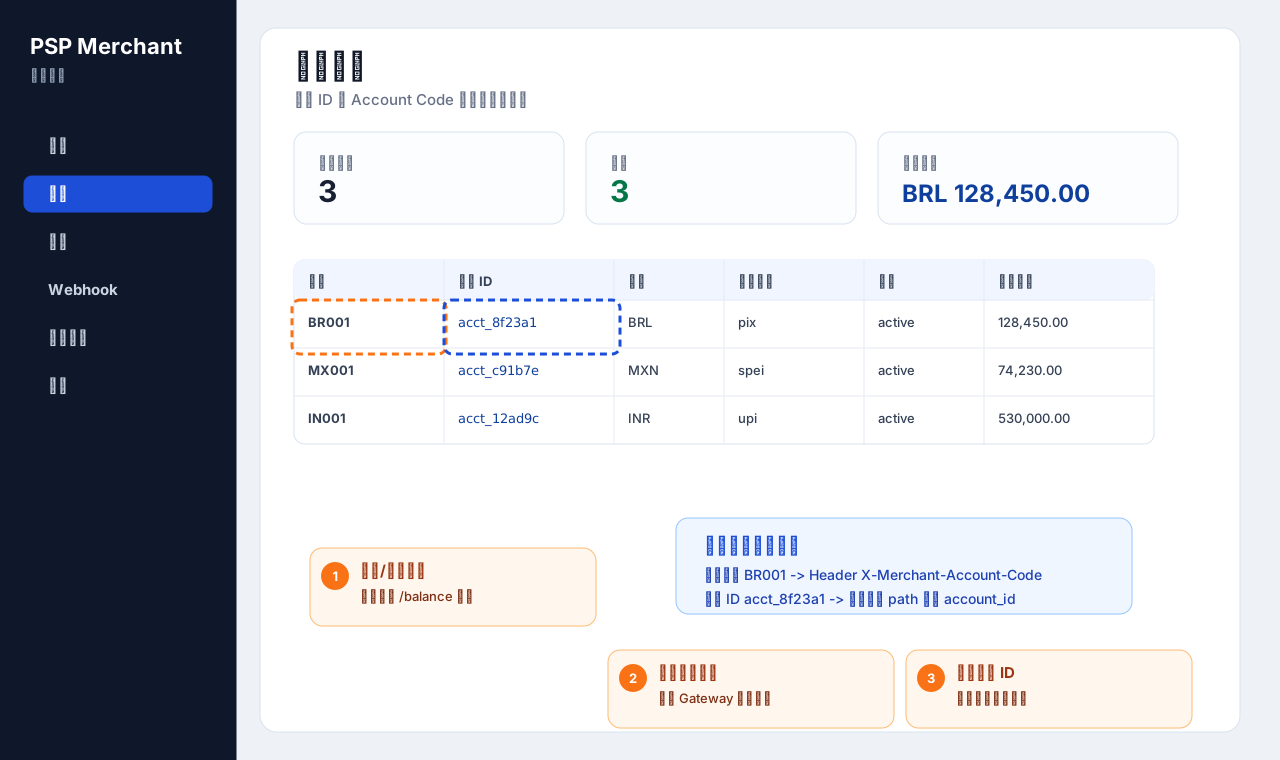
- 获取接入资料:确认 Gateway 地址、商户账户编码、账户 ID、API Key、签名 Key ID、Webhook 公钥。
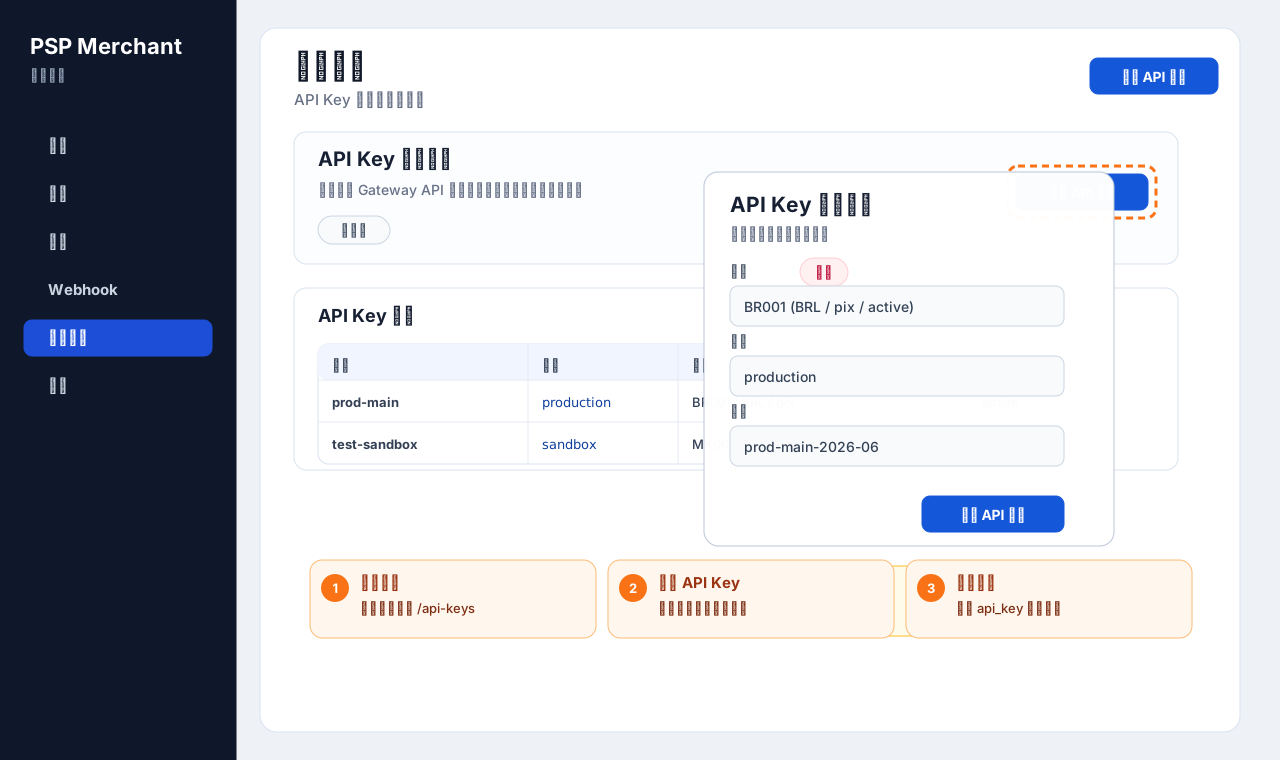
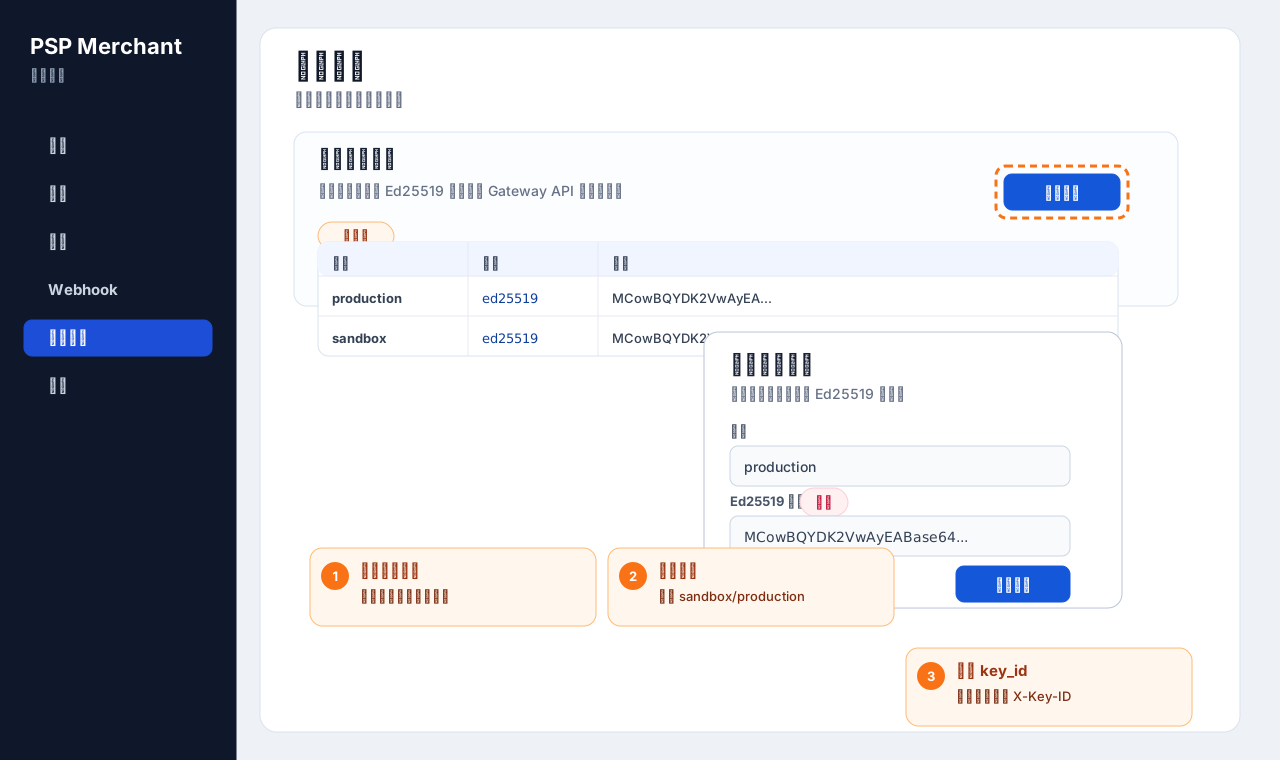
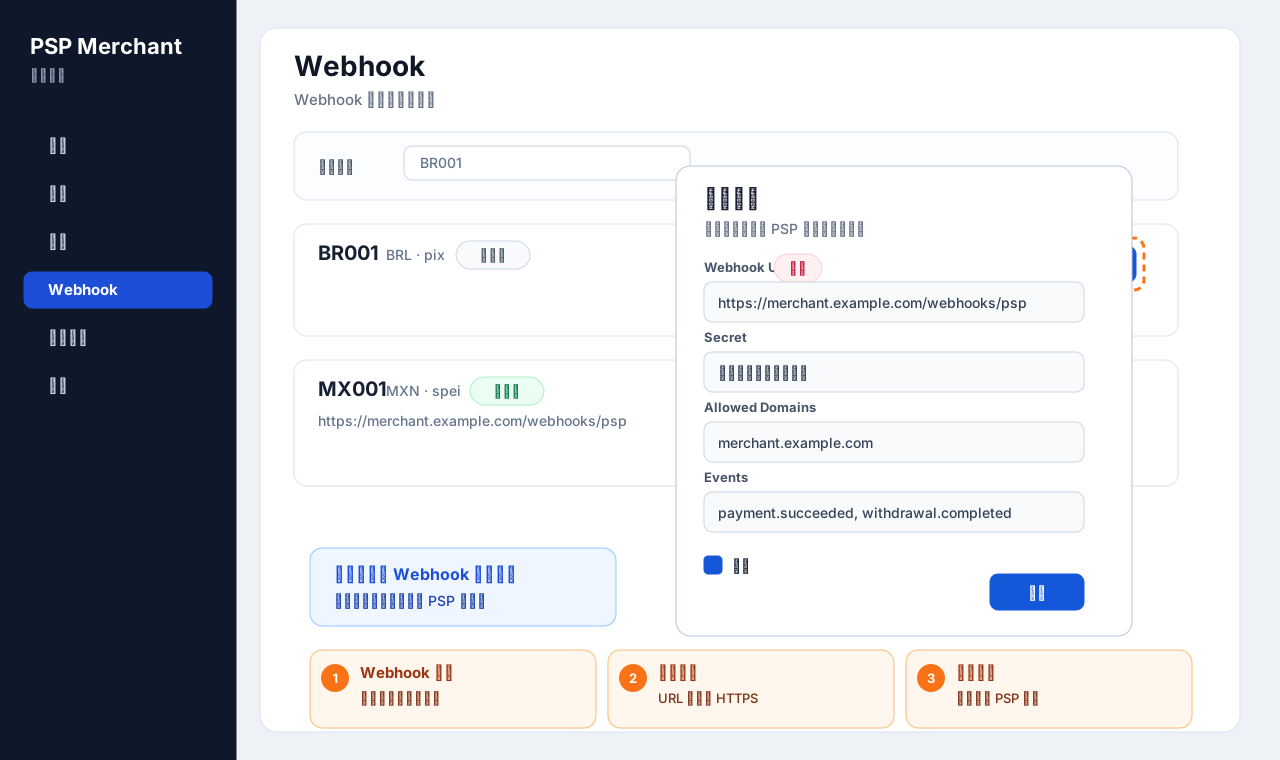
- 完成后台配置:创建 API Key,上传商户 Ed25519 公钥,配置商户 Webhook URL。
- 实现公共请求头:所有 Gateway 请求都带上 API Key、账户编码、时间戳和签名。
- 实现签名与幂等:写请求必须带
Idempotency-Key,并把幂等键放入签名字符串。
- 优先联调余额与 PIX 代收:先验证认证链路,再联调异步 Webhook。
- 接入代付和其他支付方式:代收、代付最终状态以查询接口或 Webhook 为准。
公共信息
环境变量
| 变量 | 示例值 | 说明 |
|---|
GATEWAY_BASE_URL | https://gateway.example.com | PSP Gateway API 地址。 |
API_KEY | live_xxx / test_xxx | 商户后台创建,服务端保存。 |
MERCHANT_ACCOUNT_CODE | BR001 | 商户账户编码,每次调用 Gateway 必传。 |
ACCOUNT_ID | 550e8400-e29b-41d4-a716-446655440000 | 查询余额、配置账户相关功能时使用。 |
KEY_ID | prod-main-2026-06 | 商户上传公钥后生成或约定的签名 Key ID。 |
PRIVATE_KEY_PEM | -----BEGIN OPENSSH PRIVATE KEY-----... | 商户 Ed25519 私钥,只保存在商户服务端。 |
PUBLIC_KEY_OPENSSH | ssh-ed25519 AAAA... | 上传到商户后台的 Ed25519 公钥。 |
WEBHOOK_PUBLIC_KEY_BASE64 | base64_ed25519_public_key | PSP Webhook 公钥,用于商户验签。 |
金额规则
| 字段 | 类型 | 说明 |
|---|
amount | integer | 金额使用最小货币单位。示例:BRL 100.00 传 10000。 |
currency | string | 币种大写三位 ISO 代码,例如 BRL、MXN、INR。 |
merchant_order_id | string | 商户订单号,建议全局唯一,便于对账和幂等排查。 |
metadata | object | 商户自定义信息,PSP 原样保存和返回。 |
认证方式
Gateway API 使用 API Key 加 Ed25519 签名认证。当前 Gateway 实际从 X-API-Key 读取 API Key;建议同时传 Authorization: Bearer <api_key>,用于兼容安全链路和 OpenAPI 展示。
公共 Header 参数
| 参数名 | 类型 | 必填 | 说明 |
|---|
Authorization | string | 建议 | Bearer <api_key>。 |
X-API-Key | string | 是 | API Key,Gateway 实际认证来源。 |
X-Merchant-Account-Code | string | 是 | 商户账户编码,例如 BR001。 |
X-Timestamp | integer | 是 | Unix 秒级时间戳,默认允许 60 秒时间差。 |
X-Signature | string | 是 | Ed25519 签名结果,hex 编码。 |
X-Key-ID | string | 建议 | 签名公钥标识。兼容 X-Key-Id、X-Key-Name。 |
Idempotency-Key | string | 写请求必填 | 幂等键。创建收款、创建出款等写请求必须传。 |
Content-Type | string | POST 必填 | 固定为 application/json。 |
请求签名
签名算法
| 算法 | Ed25519 |
|---|
| 编码 | X-Signature 使用 hex 编码。 |
|---|
| 签名内容 | 按下方规则拼接字符串,使用商户私钥签名。 |
|---|
| 验签公钥 | 商户在后台上传的 Ed25519 公钥。 |
|---|
读请求签名字符串
GET 请求或没有 Idempotency-Key 的请求,使用 4 行签名字符串:
<HTTP_METHOD>
<REQUEST_URI_WITH_QUERY>
<X-Timestamp>
<RAW_BODY>
写请求签名字符串
POST 请求带 Idempotency-Key 时,必须把 Header 里的幂等键作为第 4 行纳入签名:
<HTTP_METHOD>
<REQUEST_URI_WITH_QUERY>
<X-Timestamp>
<IDEMPOTENCY_KEY>
<RAW_BODY>
签名示例
POST
/api/v1/payments/intents
1781440000
ORD-10001
{"payment_method":"pix","amount":10000,"currency":"BRL","instruction":{"pix_key":"pay@example.com","pix_key_type":"email"}}
REQUEST_URI_WITH_QUERY 只包含路径和查询参数,不包含域名。签名使用的 JSON 字符串必须和实际发送的 raw body 完全一致,不要签名后再格式化 body。
签名示例代码
Node.js
const crypto = require("crypto");

function signRequest({ method, pathWithQuery, body = "", idempotencyKey = "", privateKeyPem }) {
  const timestamp = Math.floor(Date.now() / 1000).toString();
  const lines = [method.toUpperCase(), pathWithQuery, timestamp];

  if (idempotencyKey) {
    lines.push(idempotencyKey);
  }

  lines.push(body);
  const payload = lines.join("\n");
  const signature = crypto.sign(null, Buffer.from(payload), privateKeyPem).toString("hex");

  return { timestamp, signature, payload };
}

module.exports = { signRequest };
Java
import java.nio.charset.StandardCharsets;
import java.security.KeyFactory;
import java.security.PrivateKey;
import java.security.Signature;
import java.security.spec.PKCS8EncodedKeySpec;
import java.util.Base64;
import java.util.HexFormat;

public class PspSigner {
  static PrivateKey loadPrivateKey(String privateKeyPem) throws Exception {
    String pem = privateKeyPem
      .replace("-----BEGIN PRIVATE KEY-----", "")
      .replace("-----END PRIVATE KEY-----", "")
      .replaceAll("\\s", "");
    byte[] keyBytes = Base64.getDecoder().decode(pem);
    return KeyFactory.getInstance("Ed25519").generatePrivate(new PKCS8EncodedKeySpec(keyBytes));
  }

  static String sign(String method, String pathWithQuery, long timestamp, String idempotencyKey, String body, PrivateKey key) throws Exception {
    String payload = method.toUpperCase() + "\n" +
      pathWithQuery + "\n" +
      timestamp + "\n" +
      idempotencyKey + "\n" +
      body;

    Signature signer = Signature.getInstance("Ed25519");
    signer.initSign(key);
    signer.update(payload.getBytes(StandardCharsets.UTF_8));
    return HexFormat.of().formatHex(signer.sign());
  }
}
PHP
<?php
function sign_psp_request($method, $pathWithQuery, $timestamp, $idempotencyKey, $body, $privateKeyBase64) {
    $privateKey = base64_decode($privateKeyBase64);
    $payload = strtoupper($method) . "\n" .
        $pathWithQuery . "\n" .
        $timestamp . "\n" .
        $idempotencyKey . "\n" .
        $body;

    $signature = sodium_crypto_sign_detached($payload, $privateKey);
    return bin2hex($signature);
}
?>
接口接入示例
以下接口示例都放在本文档内。创建类接口必须使用 Idempotency-Key,查询类接口不需要 body。
X-API-Key 是真实认证来源
写请求必须带 Idempotency-Key
签名使用 hex 编码
body 使用原始字符串
POST
/api/v1/payments/intents
创建收款
创建一笔代收订单。PIX 返回二维码或复制码;SPEI 和 UPI 返回对应收款指令。支付结果以查询接口或 Webhook 为准。
接口信息
| 请求地址 | {GATEWAY_BASE_URL}/api/v1/payments/intents |
|---|
| 请求方式 | POST |
|---|
| Content-Type | application/json |
|---|
| 认证 | 需要公共 Header、签名和 Idempotency-Key。 |
|---|
Body 参数
| 参数名 | 类型 | 必填 | 说明 |
|---|
payment_method | string | 是 | pix、spei、upi、apple_pay、google_pay、america_cash。 |
amount | integer | 是 | 收款金额,最小货币单位。 |
currency | string | 是 | 币种,例如 BRL、MXN、INR。 |
instruction | object | 是 | 支付方式指令字段,不同方式字段不同。 |
payer_info | object | 否 | 付款人信息:name、tax_id、email、phone、account。 |
merchant_order_id | string | 否 | 商户订单号,最长 100 字符。 |
expires_in_minutes | integer | 否 | 过期分钟数,范围 1-1440。 |
allow_different_amount | boolean | 否 | 是否允许不同金额付款。 |
allow_multiple_payments | boolean | 否 | 是否允许多次付款。 |
metadata | object | 否 | 商户自定义数据。 |
instruction 参数示例
| payment_method | instruction 字段 | 说明 |
|---|
pix | pix_key、pix_key_type | PIX 收款 key 和 key 类型。 |
spei | beneficiary_clabe、beneficiary_name | SPEI 收款 CLABE 和收款方名称。 |
upi | upi_id、upi_id_type | UPI VPA 或其他 UPI 标识。 |
请求示例代码
curl -X POST "$GATEWAY_BASE_URL/api/v1/payments/intents" \
  -H "Authorization: Bearer $API_KEY" \
  -H "X-API-Key: $API_KEY" \
  -H "X-Merchant-Account-Code: BR001" \
  -H "X-Key-ID: prod-main-2026-06" \
  -H "X-Timestamp: 1781440000" \
  -H "X-Signature: <signature_hex>" \
  -H "Idempotency-Key: ORD-10001" \
  -H "Content-Type: application/json" \
  --data-raw '{
    "payment_method": "pix",
    "amount": 10000,
    "currency": "BRL",
    "instruction": {
      "pix_key": "pay@example.com",
      "pix_key_type": "email"
    },
    "payer_info": {
      "name": "Joao Silva",
      "tax_id": "12345678909",
      "email": "joao@example.com"
    },
    "merchant_order_id": "ORD-10001",
    "expires_in_minutes": 30,
    "metadata": {
      "order_id": "ORD-10001"
    }
  }'
返回响应
{
  "id": "019ec682-e915-742a-8810-d4a888712b1b",
  "collection_number": "PI_pix_20260614142208_d4a888712b1b",
  "payment_method": "pix",
  "amount": 10000,
  "currency": "BRL",
  "status": "pending",
  "state": "awaiting_payment",
  "merchant_order_id": "ORD-10001",
  "provider_transaction_id": "BRADESCO-IN-xxx",
  "instruction": {
    "pix_key": "pay@example.com",
    "pix_key_type": "email",
    "pix_txid": "BRADESCO-IN-xxx",
    "qr_code": "000201...",
    "qr_code_url": "https://...",
    "emv_code": "000201..."
  },
  "created_at": "2026-06-14T14:22:08Z",
  "updated_at": "2026-06-14T14:22:08Z",
  "expires_at": "2026-06-14T14:52:08Z",
  "allow_different_amount": false,
  "allow_multiple_payments": false,
  "metadata": {
    "order_id": "ORD-10001"
  }
}
返回字段说明
| 字段 | 说明 |
|---|
collection_number | PSP 收款单号,查询详情和对账使用。 |
status | 收款主状态,例如 pending、paid、expired、cancelled、refunded。 |
state | 更细的业务状态,例如等待付款、处理中等。 |
instruction.qr_code | PIX 二维码内容或复制码。 |
expires_at | 订单过期时间。 |
其他支付方式 Body 示例
{
  "payment_method": "spei",
  "amount": 100000,
  "currency": "MXN",
  "instruction": {
    "beneficiary_clabe": "012345678901234567",
    "beneficiary_name": "Merchant Mexico SA"
  },
  "merchant_order_id": "ORD-MX-10001",
  "expires_in_minutes": 1440
}
{
  "payment_method": "upi",
  "amount": 500000,
  "currency": "INR",
  "instruction": {
    "upi_id": "merchant@upi",
    "upi_id_type": "vpa"
  },
  "merchant_order_id": "ORD-IN-10001",
  "expires_in_minutes": 15
}
GET
/api/v1/payments/intents
查询收款列表
按支付方式、状态、商户订单号和创建时间查询当前商户账户下的收款订单。
Query 参数
| 参数名 | 类型 | 必填 | 说明 |
|---|
payment_method | string | 否 | 支付方式筛选。 |
status | string | 否 | 状态筛选。 |
merchant_order_id | string | 否 | 商户订单号。 |
created_after | string | 否 | 创建时间起始,RFC3339 格式。 |
created_before | string | 否 | 创建时间截止,RFC3339 格式。 |
limit | integer | 否 | 每页数量,默认 20,最大 100。 |
offset | integer | 否 | offset 分页偏移量。 |
cursor | string | 否 | 游标分页。传该参数时响应为 items、next_cursor、has_more。 |
请求示例代码
curl -G "$GATEWAY_BASE_URL/api/v1/payments/intents" \
  -H "Authorization: Bearer $API_KEY" \
  -H "X-API-Key: $API_KEY" \
  -H "X-Merchant-Account-Code: BR001" \
  -H "X-Key-ID: prod-main-2026-06" \
  -H "X-Timestamp: 1781440200" \
  -H "X-Signature: <signature_hex>" \
  --data-urlencode "payment_method=pix" \
  --data-urlencode "status=pending" \
  --data-urlencode "limit=20" \
  --data-urlencode "offset=0"
返回响应
{
  "items": [
    {
      "collection_number": "PI_pix_20260614142208_d4a888712b1b",
      "payment_method": "pix",
      "amount": 10000,
      "currency": "BRL",
      "status": "pending",
      "merchant_order_id": "ORD-10001",
      "created_at": "2026-06-14T14:22:08Z"
    }
  ],
  "limit": 20,
  "offset": 0,
  "total": 1
}
GET
/api/v1/payments/intents/{intent_id}
查询收款详情
根据 PSP 收款单号查询单笔收款详情。路径参数 intent_id 传 collection_number。
Path 参数
| 参数名 | 类型 | 必填 | 说明 |
|---|
intent_id | string | 是 | 收款系统单号,即 collection_number。 |
请求示例代码
curl "$GATEWAY_BASE_URL/api/v1/payments/intents/PI_pix_20260614142208_d4a888712b1b" \
  -H "Authorization: Bearer $API_KEY" \
  -H "X-API-Key: $API_KEY" \
  -H "X-Merchant-Account-Code: BR001" \
  -H "X-Key-ID: prod-main-2026-06" \
  -H "X-Timestamp: 1781440250" \
  -H "X-Signature: <signature_hex>"
POST
/api/v1/payments/transfers
创建出款
创建一笔代付订单。代付通常异步处理,商户应通过查询接口或 Webhook 获取最终结果。
接口信息
| 请求地址 | {GATEWAY_BASE_URL}/api/v1/payments/transfers |
|---|
| 请求方式 | POST |
|---|
| Content-Type | application/json |
|---|
| 认证 | 需要公共 Header、签名和 Idempotency-Key。 |
|---|
Body 参数
| 参数名 | 类型 | 必填 | 说明 |
|---|
payment_method | string | 是 | pix、spei、upi、america_ach。 |
amount | integer | 是 | 出款金额,最小货币单位。 |
currency | string | 是 | 币种。 |
beneficiary | object | 是 | 收款人信息。至少包含 name 和 account。 |
instruction | object | 否 | 支付方式补充指令。 |
merchant_order_id | string | 否 | 商户订单号,最长 100 字符。 |
description | string | 否 | 订单描述,最长 500 字符。 |
metadata | object | 否 | 商户自定义数据。 |
beneficiary 参数
| 参数名 | 类型 | 必填 | 说明 |
|---|
name | string | 是 | 收款人名称。 |
account | string | 是 | 收款账户。PIX 代付时该字段就是实际 PIX key。 |
tax_id | string | 否 | 收款人税号或身份标识。 |
email | string | 否 | 收款人邮箱。 |
phone | string | 否 | 收款人手机号。 |
bank_code | string | 否 | 银行代码,SPEI 等银行转账方式常用。 |
branch_code | string | 否 | 支行代码。 |
PIX 出款中 beneficiary.account 是实际 PIX key。如同时提交 instruction.pix_key,必须与 beneficiary.account 完全一致。
请求示例代码
curl -X POST "$GATEWAY_BASE_URL/api/v1/payments/transfers" \
  -H "Authorization: Bearer $API_KEY" \
  -H "X-API-Key: $API_KEY" \
  -H "X-Merchant-Account-Code: BR001" \
  -H "X-Key-ID: prod-main-2026-06" \
  -H "X-Timestamp: 1781440300" \
  -H "X-Signature: <signature_hex>" \
  -H "Idempotency-Key: PAYOUT-BR-20001" \
  -H "Content-Type: application/json" \
  --data-raw '{
    "payment_method": "pix",
    "amount": 10000,
    "currency": "BRL",
    "beneficiary": {
      "name": "Maria Silva",
      "tax_id": "12345678909",
      "email": "maria@example.com",
      "account": "maria@example.com"
    },
    "instruction": {
      "pix_key": "maria@example.com",
      "pix_key_type": "email"
    },
    "merchant_order_id": "PAYOUT-BR-20001"
  }'
返回响应
{
  "id": "019ec6fb-e6a6-7cbd-bb84-36b51cdfda2d",
  "payout_number": "TI_pix_20260614163417_36b51cdfda2d",
  "payment_method": "pix",
  "amount": 10000,
  "currency": "BRL",
  "status": "pending",
  "state": "created",
  "merchant_order_id": "PAYOUT-BR-20001",
  "beneficiary": {
    "name": "Maria Silva",
    "tax_id": "12345678909",
    "email": "maria@example.com",
    "account": "maria@example.com"
  },
  "created_at": "2026-06-14T16:34:17Z",
  "updated_at": "2026-06-14T16:34:17Z"
}
其他支付方式 Body 示例
{
  "payment_method": "spei",
  "amount": 10000,
  "currency": "MXN",
  "beneficiary": {
    "name": "Carlos Garcia",
    "tax_id": "GACR850101HDFRRL09",
    "account": "012345678901234567",
    "bank_code": "012"
  },
  "instruction": {
    "concepto_pago": "Pago de comisiones",
    "numeric_reference": "1234567"
  },
  "merchant_order_id": "PAYOUT-MX-20001"
}
{
  "payment_method": "upi",
  "amount": 100000,
  "currency": "INR",
  "beneficiary": {
    "name": "Rajesh Kumar",
    "account": "rajesh@upi",
    "phone": "+919876543210"
  },
  "merchant_order_id": "PAYOUT-IN-20001"
}
GET
/api/v1/payments/transfers
查询出款列表
按支付方式、状态、商户订单号和创建时间查询当前商户账户下的出款订单。
Query 参数
| 参数名 | 类型 | 必填 | 说明 |
|---|
payment_method | string | 否 | 支付方式筛选。 |
status | string | 否 | 状态筛选:pending、processing、completed、failed、returned、cancelled。 |
merchant_order_id | string | 否 | 商户订单号。 |
created_after | string | 否 | 创建时间起始,RFC3339 格式。 |
created_before | string | 否 | 创建时间截止,RFC3339 格式。 |
limit | integer | 否 | 每页数量,默认 20,最大 100。 |
offset | integer | 否 | offset 分页偏移量。 |
请求示例代码
curl -G "$GATEWAY_BASE_URL/api/v1/payments/transfers" \
  -H "Authorization: Bearer $API_KEY" \
  -H "X-API-Key: $API_KEY" \
  -H "X-Merchant-Account-Code: BR001" \
  -H "X-Key-ID: prod-main-2026-06" \
  -H "X-Timestamp: 1781440400" \
  -H "X-Signature: <signature_hex>" \
  --data-urlencode "payment_method=pix" \
  --data-urlencode "status=processing" \
  --data-urlencode "limit=20" \
  --data-urlencode "offset=0"
返回响应
{
  "items": [
    {
      "payout_number": "TI_pix_20260614163417_36b51cdfda2d",
      "payment_method": "pix",
      "amount": 10000,
      "currency": "BRL",
      "status": "processing",
      "merchant_order_id": "PAYOUT-BR-20001",
      "created_at": "2026-06-14T16:34:17Z"
    }
  ],
  "limit": 20,
  "offset": 0,
  "total": 1
}
GET
/api/v1/payments/transfers/{intent_id}
查询出款详情
根据 PSP 出款单号查询单笔出款详情。路径参数 intent_id 传 payout_number。
Path 参数
| 参数名 | 类型 | 必填 | 说明 |
|---|
intent_id | string | 是 | 出款系统单号,即 payout_number。 |
请求示例代码
curl "$GATEWAY_BASE_URL/api/v1/payments/transfers/TI_pix_20260614163417_36b51cdfda2d" \
  -H "Authorization: Bearer $API_KEY" \
  -H "X-API-Key: $API_KEY" \
  -H "X-Merchant-Account-Code: BR001" \
  -H "X-Key-ID: prod-main-2026-06" \
  -H "X-Timestamp: 1781440450" \
  -H "X-Signature: <signature_hex>"
GET
/api/v1/merchant-accounts/{account_id}/balance
查询账户余额
出款前建议先查询账户余额,重点关注 available_balance。
Path 参数
| 参数名 | 类型 | 必填 | 说明 |
|---|
account_id | string | 是 | 商户账户 ID。 |
请求示例代码
curl "$GATEWAY_BASE_URL/api/v1/merchant-accounts/$ACCOUNT_ID/balance" \
  -H "Authorization: Bearer $API_KEY" \
  -H "X-API-Key: $API_KEY" \
  -H "X-Merchant-Account-Code: BR001" \
  -H "X-Key-ID: prod-main-2026-06" \
  -H "X-Timestamp: 1781440500" \
  -H "X-Signature: <signature_hex>"
返回响应
{
  "merchant_account_id": "550e8400-e29b-41d4-a716-446655440000",
  "ledger_account_id": "ledger_001",
  "processing_balance": 200000,
  "settlement_balance": 1800000,
  "frozen_balance": 100000,
  "available_balance": 1500000,
  "currency": "BRL",
  "as_of": "2026-06-14T16:40:00Z",
  "updated_at": "2026-06-14T16:40:00Z"
}
返回字段说明
| 字段 | 说明 |
|---|
processing_balance | 处理中余额。 |
settlement_balance | 已结算余额。 |
frozen_balance | 冻结余额。 |
available_balance | 可用余额,创建出款前重点判断。 |
as_of | 余额快照时间。 |
Webhook 通知
PSP 会将代收、代付结果推送到商户配置的 Webhook URL。商户需要验证签名、做幂等处理,并快速返回 HTTP 2xx。
Webhook Header
| 参数名 | 说明 |
|---|
X-Webhook-Event | 事件类型,例如 payment.intent.completed。 |
X-Webhook-Event-ID | 事件 ID。 |
X-Webhook-ID | 本次投递 ID,建议做唯一约束。 |
X-Webhook-Version | Webhook 版本。 |
X-Timestamp | 通知时间戳。 |
X-Signature | PSP 使用 Webhook 私钥签名后的 hex 签名。 |
X-Signature-Algorithm | 固定为 Ed25519。 |
Webhook Body 示例
{
  "event": "payment.intent.completed",
  "timestamp": "2026-06-14T14:30:00Z",
  "data": {
    "collection_number": "PI_pix_20260614142208_d4a888712b1b",
    "payment_method": "pix",
    "amount": 10000,
    "paid_amount": 10000,
    "currency": "BRL",
    "merchant_order_id": "ORD-10001",
    "provider_transaction_id": "BRADESCO-IN-xxx",
    "paid_at": "2026-06-14T14:30:00Z"
  }
}
Webhook 事件
| 事件 | 说明 | 商户处理建议 |
|---|
payment.intent.completed | 代收完成 | 标记订单已支付,并用订单号做幂等。 |
payment.intent.failed | 代收失败 | 标记失败,可提示用户重新支付。 |
payment.transfer.completed | 代付完成 | 标记打款成功。 |
payment.transfer.failed | 代付失败 | 记录失败原因,按业务决定是否重试。 |
Node.js Webhook 验签示例
// npm install tweetnacl
const nacl = require("tweetnacl");

function verifyWebhook(publicKeyBase64, rawBodyBuffer, signatureHex) {
  const publicKey = Buffer.from(publicKeyBase64, "base64");
  const signature = Buffer.from(signatureHex, "hex");
  return nacl.sign.detached.verify(rawBodyBuffer, signature, publicKey);
}

function handleWebhook(req, res) {
  const rawBody = req.rawBody; // 必须是未解析、未格式化的原始 body
  const signature = req.headers["x-signature"];
  const webhookId = req.headers["x-webhook-id"];

  if (!verifyWebhook(process.env.WEBHOOK_PUBLIC_KEY_BASE64, rawBody, signature)) {
    res.statusCode = 401;
    res.end("invalid signature");
    return;
  }

  // 用 webhookId 做唯一约束,重复通知直接返回 2xx。
  res.statusCode = 204;
  res.end();
}
联调检查项
| 步骤 | 验收结果 |
|---|
| 创建 sandbox/test API Key | 商户服务端可以读取到 API Key。 |
| 上传签名公钥 | 请求签名校验通过。 |
| 配置 Webhook URL | 商户服务可收到 PSP 通知。 |
| 调用余额查询 | 返回账户余额,认证链路可用。 |
| 创建 PIX 代收 | 返回 collection_number 和二维码/复制码。 |
| 接收代收 Webhook | 验签通过,订单状态更新为已支付。 |
| 重复同一幂等键请求 | 同 key + 同 body 不重复创建订单。 |
| 创建 PIX 代付 | 最终查询状态和 Webhook 状态一致。 |
幂等重试示例
// 第一次请求
Idempotency-Key: ORD-10001
body_sha256: 6b3f...

// 安全重试:同 key + 同 body
Idempotency-Key: ORD-10001
body_sha256: 6b3f...

// 错误用法:同 key + 不同 body,会返回 422 VALIDATION_ERROR
Idempotency-Key: ORD-10001
body_sha256: 9a01...
错误码
| HTTP / Code | 常见原因 | 处理方式 |
|---|
400 INVALID_REQUEST | 缺少必填字段、JSON 格式错误、缺少账户编码。 | 检查请求体和 Header。 |
401 UNAUTHORIZED | API Key 错误、X-API-Key 缺失、账户编码无效。 | 确认 X-API-Key、Authorization 和账户编码。 |
401 SIGNATURE_INVALID | 签名字符串不一致、签名不是 hex、body 被格式化后再发送。 | 用实际发送的 raw body 重新签名。 |
403 FORBIDDEN | API Key scope 不足、商户或账户状态不可用、IP 未进白名单。 | 检查权限、商户状态和出口 IP。 |
409 IDEMPOTENCY_CONFLICT | 幂等键冲突。 | 确认重试是否使用同一个 body。 |
422 VALIDATION_ERROR | 同一个 Idempotency-Key 搭配了不同 body。 | 重试必须保持 body 不变。 |
422 INSUFFICIENT_BALANCE | 可用余额不足。 | 先查询余额,充值或等待入账后重试。 |